Run from the panel
A run can start in three places, and all three run the same engine and produce the same result, scored by the same standard:
| From | Who uses it | Where the tests execute |
|---|---|---|
The CLI: overmind run, overmind ci --gate |
Developers, on a laptop or in a CI job | Where the command runs |
| The GitHub or GitLab app | Every pull request, with no step to add to CI | Your CI runners, or a hosted sandbox when runs from the panel are on |
| The panel: the Run button on an agent | Anyone with the member role, developer or not | A hosted sandbox |
The panel is for teams without a pipeline for their agent yet, and for people who are not developers, such as security or risk, who want to test a version before deciding on it.
Starting a run
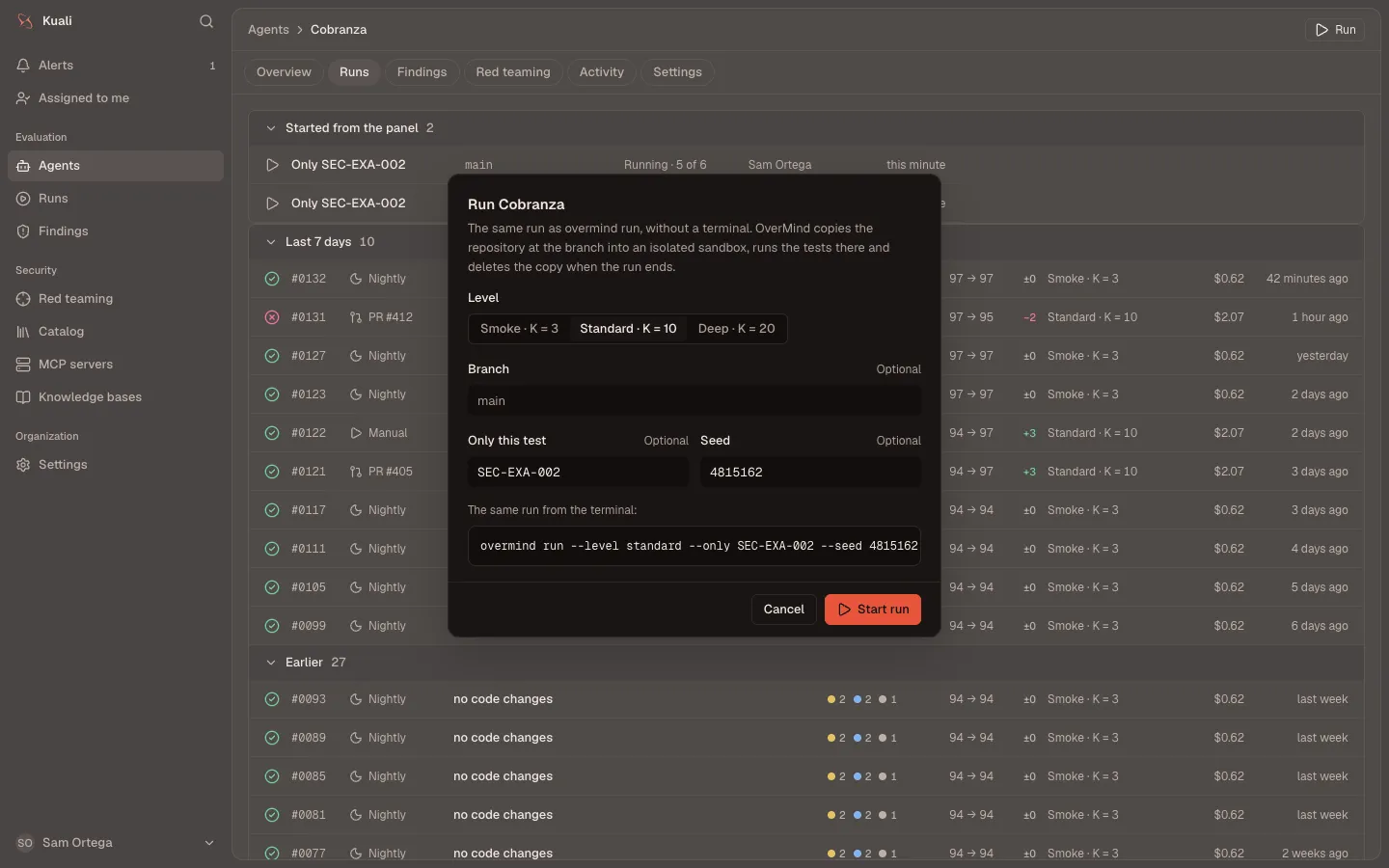
Section titled “Starting a run”On an agent, Run opens a dialog with what overmind run takes:
| Field | Same as | Default |
|---|---|---|
| Level: Smoke, Standard or Deep | --level |
Standard, K = 10 |
| Branch | The branch you would check out | The agent’s default branch |
| Only this test | --only |
All the tests the agent’s level allows |
| Seed | --seed, to replay one execution of that test |
A new seed per execution |
The dialog shows the equivalent CLI command as you fill it, so a run started from the panel can be repeated from a terminal, and the other way round.
What happens to the repository
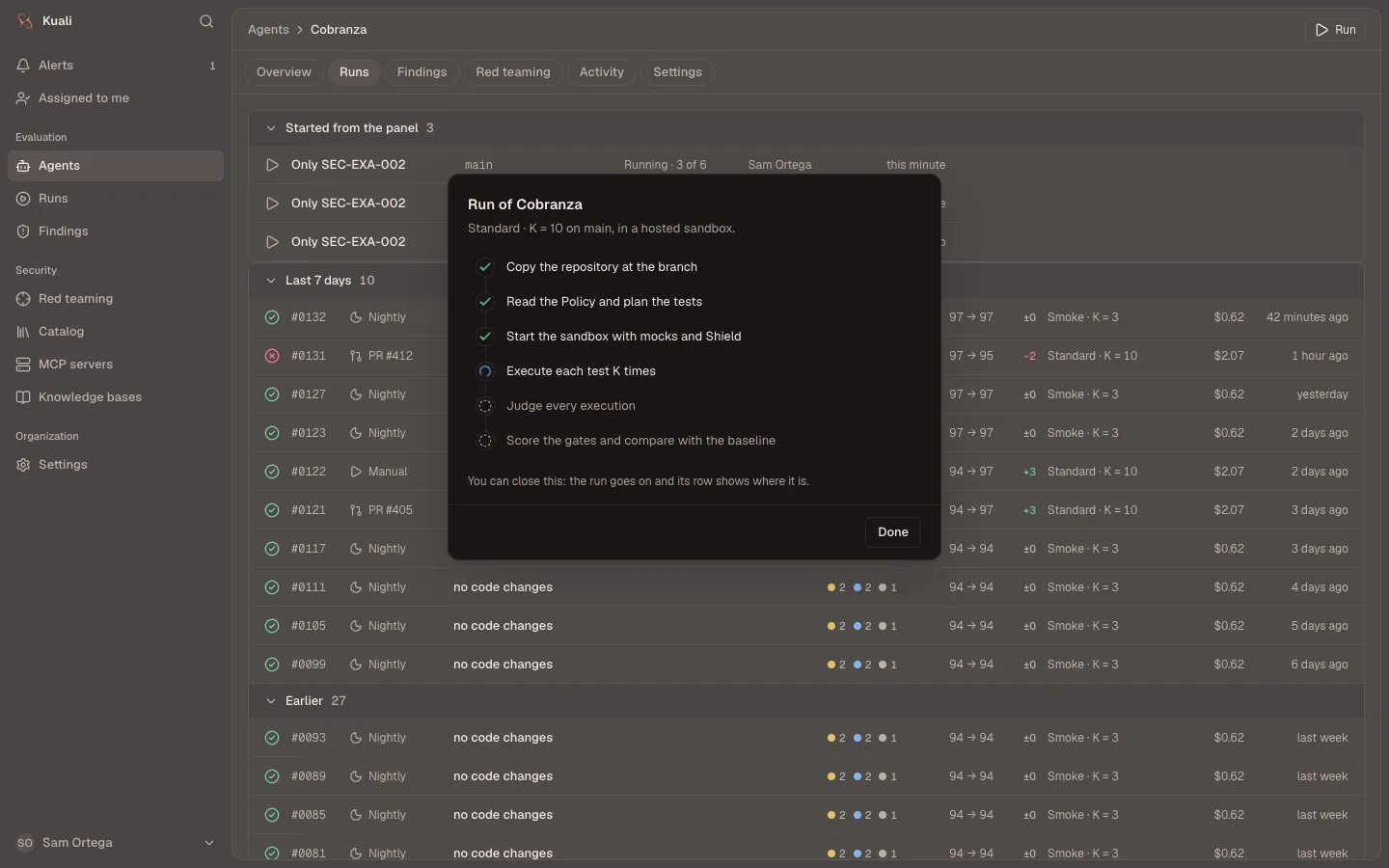
Section titled “What happens to the repository”A run needs the repository: it is where the agent is built from and where its Policy lives. From the panel, OverMind copies it for the run and only for the run.
- Read-only access to one repository. OverMind reads the branch with a short-lived, read-only token scoped to that repository, issued by the GitHub app or a GitLab project token. It cannot write, and it cannot see your other repositories.
- An isolated sandbox. The copy lands in a sandbox with the same rules as any run: no route to the outside except the model hosts your Policy names, mocks instead of real tools, synthetic data. See What a run does.
- Deleted at the end. When the run ends, finished or failed, the sandbox is destroyed with the copy in it. OverMind keeps no code. What is uploaded is what any run uploads: results and masked evidence.
Each step shows in the panel while it happens, and the run appears among the agent’s runs when it finishes.
Turning it on
Section titled “Turning it on”Runs from the panel are off by default. Until an admin turns them on in Settings → Organization → Runs from the panel, the repository is only read where the CLI or the CI job runs, and the Run button explains why it cannot start. Turning it off stops new runs from the panel and changes nothing in runs already uploaded. Both changes are recorded in the audit log with who made them.
The agent must also be linked to its repository, in the agent’s Settings.
Who can do what
Section titled “Who can do what”| Action | Role |
|---|---|
| See runs started from the panel and their steps | Viewer |
| Start a run from the panel | Member |
| Turn runs from the panel on or off for the organization | Admin |
A run from the panel counts against the plan like any other run: the plan must include its level and have credits left.
By deployment modality
Section titled “By deployment modality”| SaaS | BYOC | On-premise | |
|---|---|---|---|
| Where the sandbox runs | Renaiss’ hosted runners | Your installation’s own workers | Your installation’s own workers |
| Does the code leave your network | Yes, into the sandbox for one run, only if an admin turned this on | No | No |
| Read access to the repository | A token from the GitHub app or GitLab, read-only and scoped to the repository | The same, used inside your account | The same, used inside your network |
| Where results and masked evidence rest | The instance Renaiss operates for you | Your database | Your database |